
You run an online shop, you know structured data matters, and you are not sure which types belong on which template. Adding everything to everything is the usual mistake. For schema markup for ecommerce website templates, the short answer is this: put Product with a nested Offer on each individual product page, add BreadcrumbList wherever the page has a meaningful navigation trail, describe the business once with Organization (or the OnlineStore subtype) on the homepage, and skip types that do not describe the page. This guide maps each type to its page, shows a minimal example with fictional values, and explains how to confirm that what crawlers read matches what shoppers see. It is based on Google Search Central documentation checked on October 11, 2026. Passing a test never guarantees a rich result, rankings or traffic. For platform context, see the overview of schema markup benefits for Shopify stores and what they can and cannot do.
Table of Contents
Schema Markup for Ecommerce Website: Which Type Goes on Which Page
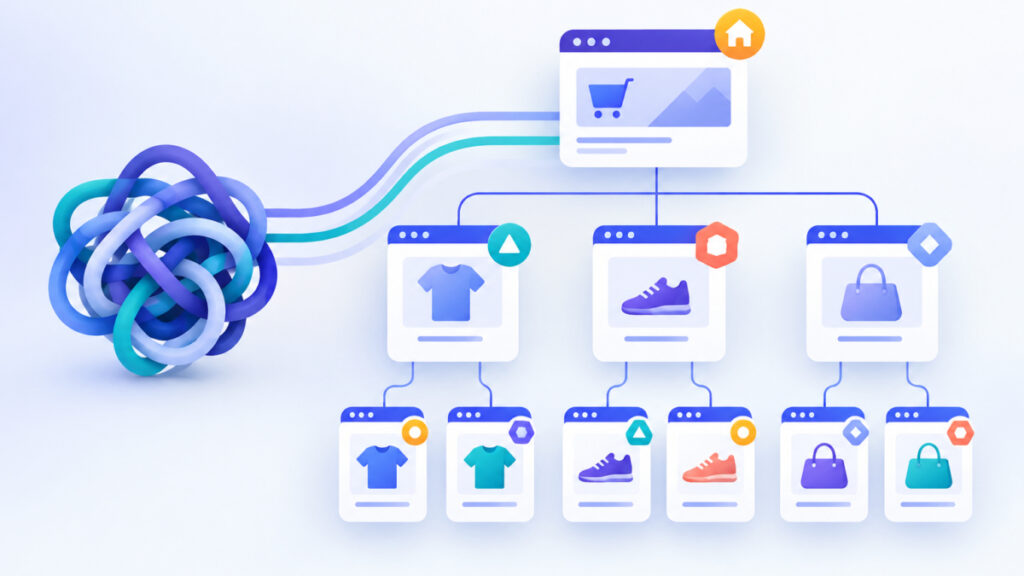
Each template in a shop answers a different question, so each needs a different description. Use this table as a starting map, then read the sections below for the reasons and exceptions.
| Page | Type to consider | Notes |
|---|---|---|
| Single product page | Product with a nested Offer, plus BreadcrumbList | Describe the one item sold on that page, or variants of that one product. |
| Category or collection page | BreadcrumbList | Do not add Product rich-result markup to a general list of different products. |
| Homepage | Organization or OnlineStore | Google says Organization markup need not appear on every page. |
| Physical storefront | A suitable LocalBusiness subtype | Follow its separate guidance; not every online shop is a local location. |
| Cart, checkout, account | Usually none | These pages do not describe a product or the business. |
The rule behind the table: the type must describe the exact page a visitor lands on. A category page displays many products, but it is not a page about one product.

JSON-LD and Required vs Recommended Properties
Structured data describes what a page contains. JSON-LD is a format that expresses that description in a script block in the HTML head or body, and Google Search Central recommends it when practical. Schema.org defines the types and properties. Google’s documentation then states which properties are required or recommended for a particular Search feature. A property can be valid schema.org vocabulary and still not make a page eligible for a Google rich result.
Required properties are a prerequisite for the matching feature. Recommended properties add useful detail when they are accurate. For Google’s product snippets, Product.name is required, along with at least one of offers, review or aggregateRating. Merchant listings are stricter: they need an Offer (not AggregateOffer), and priceCurrency is required there while only recommended for snippets. Reviews and ratings are not mandatory, and you should never invent them.
To draft the block without hand-writing it, the Schema Markup Generator builds JSON-LD from a form for products, organizations and other types. Use only details that are visible on the page you are marking up.

Product Page Example: Product with a Nested Offer
A product page is where schema markup for ecommerce website owners pays most attention. The example below uses fictional values for a steel bottle. It includes only properties the imagined page would actually show: name, image, SKU, brand, price, currency, availability and the offer URL. There are no ratings, because this page has no genuine reviews.
{
  "@context": "https://schema.org",
  "@type": "Product",
  "name": "Summit Steel Bottle 24 oz",
  "image": "https://www.example.com/images/summit-steel-bottle.jpg",
  "sku": "SG-24-STL",
  "brand": {
    "@type": "Brand",
    "name": "Summit Gear"
  },
  "offers": {
    "@type": "Offer",
    "url": "https://www.example.com/summit-steel-bottle",
    "price": "29.00",
    "priceCurrency": "USD",
    "availability": "https://schema.org/InStock"
  }
}
Write the price as a plain number with no currency symbol, and use a three-letter currency code. If the page shows 29.00 USD and in stock, the markup says the same. The Product Schema Generator can produce this structure with price, availability, brand and SKU fields, and you then paste the result into the product template.
What to Do When Variants Have Different Prices
If sizes or colors differ in price or stock, one price for the whole group is misleading. Represent each relevant variant with its own Offer that matches that variant. Google’s product variants documentation covers ProductGroup and Product markup, with single-page and multiple-page examples and the unique identifiers variants need. Read it before marking up a large variant catalogue.
- Decide whether each variant has its own URL or all variants share one page.
- Give every variant its own identifier, such as a SKU, and its own price, currency and availability.
- Do not use AggregateOffer to describe a set of variants. Google explicitly advises against that.
- If a script changes the selected variant, confirm that the displayed selection, offer URL, price, currency and stock state all agree with the markup.
- For several currencies, give each currency a distinct URL, as Google advises.
Google can process JSON-LD added by JavaScript, but it warns that dynamically generated Product markup can make Shopping crawls less frequent and less reliable for fast-changing prices and availability. Server-delivered markup is a sensible first choice where feasible, though it is not an absolute eligibility requirement.
Category Pages, Breadcrumbs and the Homepage
On a category page, the safest useful addition is BreadcrumbList, provided the trail reflects real navigation. Google recommends Product markup on pages focused on one product or variants of it, so do not wrap every item in a collection grid with Product rich-result markup. Add the same breadcrumb type to product pages when their trail is meaningful.
Google’s breadcrumb feature needs a BreadcrumbList with at least two ListItem entries, and it recommends a typical user path rather than a mechanical copy of URL segments. Its documentation describes the feature on desktop, so do not expect one appearance everywhere. If a page has no useful hierarchy, skip it. The Breadcrumb Schema Generator builds this JSON-LD from names and URLs.
{
  "@context": "https://schema.org",
  "@type": "BreadcrumbList",
  "itemListElement": [
    {"@type": "ListItem", "position": 1, "name": "Home", "item": "https://www.example.com/"},
    {"@type": "ListItem", "position": 2, "name": "Bottles", "item": "https://www.example.com/bottles/"},
    {"@type": "ListItem", "position": 3, "name": "Summit Steel Bottle 24 oz"}
  ]
}
On the homepage, identify the business with Organization markup. Google recommends the more specific OnlineStore subtype for an ecommerce business. If you also have a physical storefront, assess the applicable LocalBusiness subtype and its own guidance instead of copying online-shop markup.
Avoiding Mismatches and Knowing When to Skip a Type
The core accuracy rule is simple: generate the visible price and the marked-up price, currency and availability from the same current product data. Hand-typed JSON-LD drifts out of date the first time a sale starts or an item sells out. Recheck after price changes, stock updates, currency-specific URLs and variant selections.
- Do not mark up content shoppers cannot see, or claims the page does not make.
- Use reviews and ratings only when they are genuine and shown on the page.
- Skip BreadcrumbList where no real hierarchy exists.
- Skip Product markup on mixed-product lists, carts and account pages.
- Review Google’s structured data policies if you are unsure whether a value is acceptable.
Leaving a type out is better than publishing a guess. Warnings in a test are not a reason to invent data.
How to Check Schema Markup for an Ecommerce Website in the Delivered HTML
Test live, public URLs for one representative page per template. Follow these steps in order.
- Draft the markup, then open the exact product or category URL in View Page Source and search the raw HTML for
application/ld+json. If your JSON-LD is there, it is in the delivered HTML. If it is missing, that does not prove Google cannot see markup added during rendering. - Run the same URL through the Spider Simulator and compare its Source and Text views. Confirm the product name and displayed price are extractable. This is a first-look approximation, not Googlebot or Google’s rendered index.
- Paste the block into the Schema Markup Validator to catch syntax errors and missing key properties before deployment.
- Use the Meta Tags Analyzer to review the surrounding title and description. It checks those tags, not structured data eligibility.
- Run Google’s Rich Results Test on the applicable page, then use Search Console URL Inspection after deployment to see Google’s view.
Each tool has a different job, and none replaces the Google checks in the last step.
Validation Checklist and Next Actions
- The type describes this exact page, not another page or a mixed-product collection.
- Product and Offer values reflect the selected, purchasable item.
- Price, currency, availability, URL and any stated reviews agree with the page.
- Variant identifiers and offers are distinct where needed.
- Breadcrumb items reflect real navigation.
- The JSON-LD is syntactically valid and, preferably, in delivered HTML. If it is injected later, test the rendered page too.
- Required fields for the relevant Google feature pass the Rich Results Test, and warnings are reviewed without inventing data.
- The live URL is accessible for inspection.
Next actions: implement on one representative page of each applicable template, validate the live URLs, fix mismatches, then extend to the remaining pages. Recheck whenever pricing or inventory logic changes.
Frequently asked questions
Which pages need which schema type in an online store?
Product pages suit Product with a nested Offer and, where the trail is meaningful, BreadcrumbList. Category pages suit BreadcrumbList. The homepage suits Organization or the OnlineStore subtype. Pages such as cart and checkout usually need none.
Should I add Product markup to category pages?
Generally no. Google recommends Product markup on pages focused on one product or variants of it. A category page lists different products, so BreadcrumbList is the safer addition there.
What if my product variants have different prices?
Mark up each relevant variant with its own Offer and identifier so price and availability match the selected variant. Google advises against AggregateOffer for variants, and its product variants documentation shows ProductGroup examples.
How do I stop markup and visible content from disagreeing?
Generate both the visible price and the JSON-LD from the same current product data, and recheck after sales, stock changes, currency changes and variant selection. Do not mark up values shoppers cannot see.
Is JSON-LD added by JavaScript acceptable?
Google can process rendered JSON-LD, but it warns that dynamically generated Product markup can make Shopping crawls less frequent and less reliable for fast-changing prices and availability. Server-delivered markup is a useful first choice where feasible.
Do I need review or rating markup?
No. For product snippets you need Product.name and at least one of offers, review or aggregateRating, so a valid offer can satisfy that. Use reviews only when they are genuine and shown on the page.
Will valid markup guarantee rich results or better rankings?
No. Valid markup and passing required fields only make a page potentially eligible. Google decides whether to show any enhancement, and markup does not promise rankings or traffic.
Next steps
Good schema markup for ecommerce website templates is mostly about restraint and accuracy. Use Product with an Offer on product pages, BreadcrumbList where the trail is real, and Organization or OnlineStore on the homepage. Keep every marked-up value tied to the same data shoppers see, and skip types that do not fit. Start with one template, check it in the delivered HTML, and confirm with Google’s own tools. Markup supports understanding, but eligibility for rich results is never guaranteed.
Related tools and resources on AllEasySEO:
- Schema Markup Benefits Shopify SEO Structured Data
- Schema Markup Generator
- Product Schema Generator
- Breadcrumb Schema Generator
Sources and further reading
- https://developers.google.com/search/docs/appearance/structured-data/product-snippet
- https://developers.google.com/search/docs/appearance/structured-data/merchant-listing?hl=en
- https://developers.google.com/search/docs/appearance/structured-data/product-variants
- https://developers.google.com/search/docs/appearance/structured-data/organization?price=FREE
- https://developers.google.com/search/docs/specialty/ecommerce/include-structured-data-relevant-to-ecommerce?hl=en
- https://developers.google.com/search/docs/appearance/structured-data/breadcrumb?content_language=English
- https://developers.google.com/search/docs/appearance/structured-data/intro-structured-data?version=published
- https://developers.google.com/search/docs/appearance/structured-data/generate-structured-data-with-javascript?hl=en
- https://developers.google.com/search/docs/appearance/structured-data/sd-policies
- https://alleasyseo.com/spider-simulator